


Clean Sweep Master
4.2900.00 Reviews
App Specs
- Version
- 1.2.0
- Updated On
- License
- Free
- Downloads
- 5,000,000+
- Developer
- ZJDevKing
- Categories
- Productivity
- Platform
- Android
Screenshots
 Analysis by AppCompare
When my phone starts filling up, I prefer to deal with the clutter before it turns into a bigger chore. Clean Sweep Master is a free Android productivity app from ZJDevKing that brings several cleanup and device-management tools together. I’d approach it as a hands-on helper rather than a magic fix: it can make routine housekeeping easier, but it can’t replace deciding what I actually want to keep.
Start with the problem, not the big button
A useful time to open a cleaner is when storage warnings appear, an old phone feels sluggish, or unused apps have quietly accumulated. Before scanning, I’d take a moment to think about what matters: saved downloads, offline maps, photos, and message attachments can all be more valuable than their filenames suggest. A cleanup tool is most helpful when it points me toward candidates to review, not when I treat every item it labels as expendable.
That distinction matters because “junk” is not always obvious to the person using a device. If I have a trip coming up, for example, an offline map that I rarely open may be essential. I’d avoid making a sweeping deletion simply because a scan reports a large amount of clutter. A quick look at what the app has identified can prevent the frustrating outcome of clearing something I later need.
A practical pass through the tools
My first stop would be the junk cleaner, then I’d review its findings before removing anything. That makes the scan a starting point for a small maintenance routine, rather than a command to clear everything in one go. If storage is tight, I’d follow it by opening the app manager and checking the largest apps against what I actually use. An app that takes up space but holds work or travel data deserves more thought than a game I abandoned months ago.
The booster is better treated as a quick troubleshooting step than a permanent performance plan. If an app is misbehaving or the phone has become temporarily unresponsive, trying a boost is an easy experiment. I wouldn’t make it a habit every few minutes, though: repeated tapping can become busywork, and it doesn’t address the reason a device may be slow in the first place. If lag returns immediately, I’d look at storage, the apps I’ve installed, and the phone’s age rather than assuming another boost will solve it.
The battery suggestions and notification controls fit into a separate kind of cleanup: reducing background drain and interruptions. I’d start with one suggested change, then use the phone normally for a while before deciding whether it helped. That makes it easier to notice whether a change has an effect, instead of altering several things at once and guessing. For notifications, I’d focus on the apps that interrupt me most; silencing useful alerts just to make the screen quieter can create a different problem.
How it fits into an everyday routine
Picture me getting ready to record a long event when my phone warns that space is running low. I could scan with the cleaner, inspect what it flags, and then use the app manager to find a large app I no longer need. If I still have a laggy phone afterward, I could try the booster and see whether the immediate experience improves. Once I’m done, I’d check that the files and apps I rely on are still there before heading out.
Worth Reading Before You Choose

EA SPORTS FC Mobile 26 Is a Bigger Football Game, but It Takes Time

Flipboard Shows What News Apps Must Do Beyond the Feed

Switching to Android Auto Means Rethinking Your Driving Routine

Google Calendar Makes a Crowded Week Easier to Manage

Ludo King Makes the Most of the Minutes Between Plans

Baby Panda World Brings Quick Play to Modern Phones, but Its Game Library Feels Busy
That sequence is more useful than treating the app as a one-tap rescue button: identify the pressure, review possible causes, make a reversible choice where possible, and check the result. If the phone is slow because it is old or an app itself is faulty, cleaning may have limited impact. If the problem is simply a crowded device and neglected apps, the same short routine can make the next step clearer.
Where the handoffs can be awkward
Clean Sweep Master puts cleanup, boosting, app management, battery suggestions, and notification controls under one roof, which is convenient when I want a quick overview. The trade-off is that each task still leads back to a decision I have to make. I need to judge whether a file is safe to remove, whether an app is truly unused, and whether a suggested battery change is worth the inconvenience. The tool can organize that work, but my own priorities determine the outcome.
Compared with cleaning manually through Android’s built-in storage settings, an all-in-one app may feel more approachable because related tasks sit together. The built-in route can be a better choice if I want to inspect storage in the system’s own menus and avoid adding another utility. A dedicated file manager may suit someone who wants more direct control over folders, while a cleaner is more appealing when the aim is a guided sweep across several types of maintenance. I would choose based on the job, not assume one approach is best for every phone.
There are also practical questions about how often to use it. I’d run a scan when I have a specific storage concern, not on a rigid daily schedule. If the phone is working well and has plenty of room, there may be little reason to keep repeating the same cleanup. For an older device, I’d keep expectations modest: the app supports Android 6.0 and newer, but compatibility alone does not mean every older phone will feel faster after a boost.
First Impressions
Okay, so I downloaded Clean Sweep Master after hearing a lot about its capabilities. The installation was super quick, and it didn’t demand much of my phone’s precious space. Right off the bat, I was greeted by a sleek and simple interface. It’s not cluttered, which is a big plus for someone like me who gets overwhelmed with too many buttons and options.
Exploring the Features
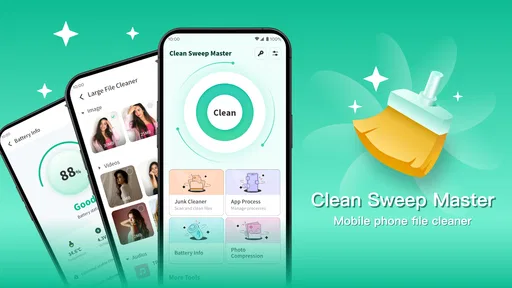
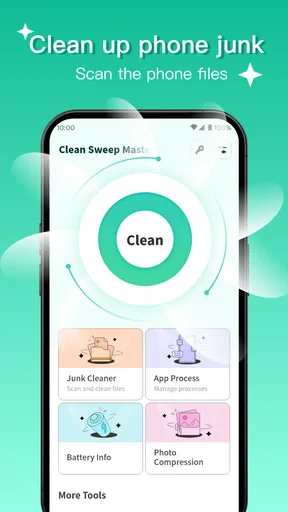
The main dashboard is divided into a few sections: junk cleaner, phone booster, and app manager. Sounds pretty standard, right? But here’s where it gets interesting.
Junk Cleaner: This is the feature I was most excited about. After running a quick scan, it identified a ton of junk files I didn’t even know existed. It’s like the app had x-ray vision for unnecessary files. With one tap, I got rid of everything slowing down my phone.
Phone Booster: We’ve all been there—your phone starts lagging when you need it the most. The booster function promises to speed things up, and I have to say, it delivered. My phone felt noticeably snappier after a quick boost session.
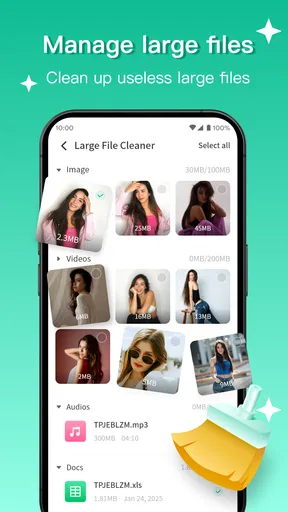
App Manager: This one’s a lifesaver if you’re like me and hoard apps you never use. It shows you which apps are taking up the most space and lets you uninstall them with a few taps. I finally let go of that game I hadn’t played in months.
What Stands Out?
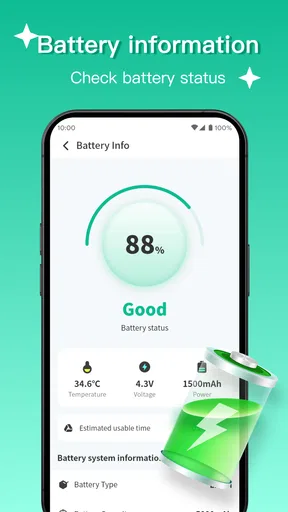
Apart from its core features, Clean Sweep Master has a few extras that are great bonuses. For instance, the battery saver mode is pretty neat. It identifies battery-draining apps and suggests optimizations. I noticed a decent increase in battery life after following its advice.
Another cool feature is the notification cleaner. We all get bombarded with unnecessary notifications, and this tool lets you manage them more efficiently. Less distraction, more focus.
Any Downsides?
Now, let’s talk about the flip side. While the app is generally intuitive, I found that the ads can be a bit intrusive. They pop up often enough to be a tad annoying, but I guess it’s a trade-off for a free app. There is a premium version available that promises an ad-free experience, so that might be worth considering if you end up loving the app as much as I did.
Another thing I noticed is that the app runs best on newer devices. If your phone is a bit older, you might not experience the full benefits of the speed boost.
Final Thoughts
Overall, Clean Sweep Master does a stellar job at tidying up your phone and keeping it running smoothly. It’s like having a digital housekeeper that makes sure everything is in order. If you’re struggling with a sluggish device, this app might just be what you need.
It’s straightforward, effective, and has a few nice extras that make it stand out from the crowd. Just be prepared for a few ads, or consider the premium version if they bug you too much. If you decide to give it a try, let me know how it goes!
Who will get the most from it?
I think the best fit is someone who wants a simple place to begin when a phone feels crowded, but doesn’t enjoy navigating several separate settings screens. Clean Sweep Master has a 4.7 average from around 8,900 ratings and over 1 million installs, so it has attracted a sizeable audience; those figures are useful context, not a guarantee that it will suit every device or solve every slowdown. It is rated for Everyone, and version 1.1.1 is the current release.
It is less compelling for people who already manage storage confidently, want granular folder-by-folder control, or expect a cleaner to repair a worn-out phone. If I were troubleshooting persistent crashes, overheating, or a single badly behaving app, I’d start with the relevant Android settings or investigate that app directly. A broad cleanup pass is not a substitute for diagnosing a specific fault.
Small choices that make a cleanup safer
One helpful habit is to treat the scan as a checklist, not an instruction. I’d clear only the items I recognize or can safely do without, then pause and see whether the phone has enough space for the task I’m trying to do. That is especially sensible before a camera-heavy day, a software download, or travel, when deleting something inconveniently can matter more than reclaiming a little extra room.
I’d also separate storage work from notification and battery changes. Those controls affect different parts of the daily experience, so changing them all at once makes it harder to tell what improved. If battery life is the concern, I’d try one suggestion and observe a normal day; if interruptions are the issue, I’d adjust only the noisiest apps first. This measured approach keeps the app useful without turning maintenance into another source of distraction.
For someone who wants a low-effort sweep, the free price makes it easy to consider, though the ads are a real part of the experience and may interrupt the flow. I would not install it expecting a completely hands-off service: reviewing results is part of using any cleanup tool responsibly. On the other hand, if a tidy dashboard helps you actually deal with unused apps and clutter, that convenience can be more valuable than a collection of separate utilities.
My closing take
After weighing the workflow as a whole, I see Clean Sweep Master as a practical organizer for routine Android housekeeping, not an essential system component. Its strongest case is convenience: scan, inspect, remove what you no longer need, and then use the related tools only when they address a real annoyance. The main compromises are the ads, the need for personal judgment before cleanup, and the fact that a boost cannot make an older device behave like a new one.
I’d recommend giving it a try if your phone is cluttered and you want a straightforward starting point, especially if unused apps and scattered maintenance tasks are the issue. I’d skip it if you prefer Android’s built-in controls, need advanced file management, or are looking for a fix to a deeper hardware or software problem. Used selectively, it can make the path from “my phone feels messy” to a more manageable device less of a chore.
Pros
- Intuitive and user-friendly interface.
- Efficient junk file cleaning.
- Boosts device performance quickly.
- Customizable cleaning schedules.
- Supports multiple languages.
Cons
- Contains ads in the free version.
- Limited features without premium.
- Occasional false positives in scans.
- Requires frequent updates.
- Consumes battery during deep scans.
FAQs for Clean Sweep Master
What is Clean Sweep Master and what does it do?
Clean Sweep Master is an optimization app designed to enhance the performance of your Android or iOS device. It cleans junk files, manages background processes, and increases storage space by removing unnecessary files. It also features a battery optimizer and a CPU cooler to ensure your device runs smoothly.
Is Clean Sweep Master safe to use on my device?
Yes, Clean Sweep Master is safe to use. It has been tested thoroughly to ensure it doesn't delete any essential files or cause harm to your device. The app uses advanced algorithms to identify only non-essential files, and it respects your privacy by not accessing personal data without permission.
How often should I use Clean Sweep Master?
The frequency of use depends on your device's performance and storage needs. For optimal results, it's recommended to run Clean Sweep Master at least once a week. Regular use ensures your device remains fast and efficient, preventing clutter and maintaining smooth operation.
Does Clean Sweep Master work on both Android and iOS devices?
Yes, Clean Sweep Master is available for both Android and iOS platforms. The app is designed to cater to the specific needs of each operating system, providing tailored solutions for optimizing performance and storage across different types of devices.
Are there any in-app purchases or advertisements in Clean Sweep Master?
Clean Sweep Master offers a free version with basic features supported by advertisements. For an ad-free experience and access to premium features, users can opt for in-app purchases. The premium version provides enhanced functionality, such as deeper cleaning options and advanced battery management tools.


